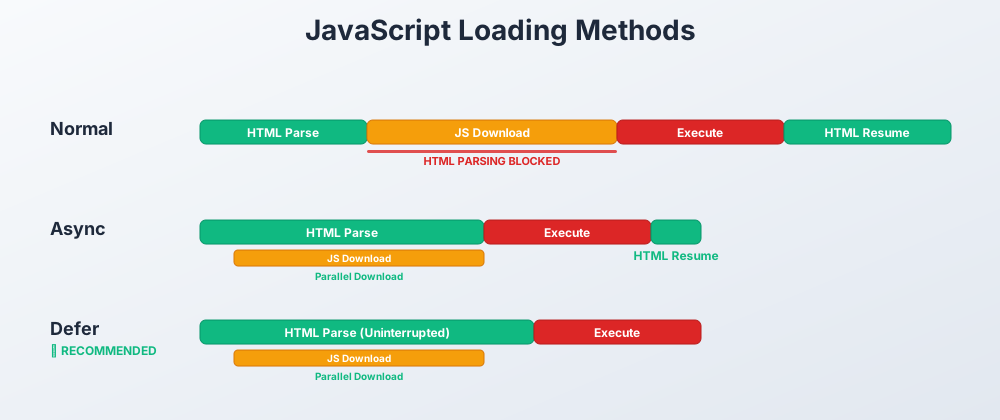
Loading JavaScript in the Browser
When building web applications, how you load JavaScript matters. Different loading methods can dramatically affect your page's performance and user experience.
HTML Parsing Fundamentals
When a browser loads a webpage, it follows a specific process:
- Download HTML from server
- Parse HTML from top to bottom
- Build the DOM (Document Object Model)
- Render the page to user
How JavaScript Works Normally
- JavaScript blocks HTML parsing by default
- Browser stops everything to download and execute JavaScript files
- Only continues parsing after JavaScript files are done executing
Normal Loading (Default)
<script src="script.js"></script>

What Happens
- Browser reaches
<script>tag - Stops parsing HTML
- Downloads JavaScript file
- Executes JavaScript immediately
- Resumes HTML parsing
Body Loading
Since the <script> tag executes immediately, if it's in the <head>, it runs before the body is fully loaded:
<body>
<h1>Hello World</h1>
<script src="script.js"></script>
</body>
You may see code like the above to get around this problem.
Pros
- ✅ Consistent Script Execution - scripts run in the order they appear
Cons
- ❌ Blocks HTML parsing - slows down page load
- ❌ Doesn't Wait For DOM - scripts run before DOM is ready if not at the end of
<body> - ❌ Slow - doesn't allow parallel downloads
Async Loading
<script src="script.js" async></script>

What Happens
- Browser reaches
<script>tag - Continues parsing HTML while downloading JS in the background
- Stops parsing when JS download completes
- Executes JavaScript immediately
- Resumes HTML parsing
Pros
- ✅ Non-blocking - while downloading
Cons
- ⚠️ Still blocks parsing - while executing
- ❌ Unpredictable order - scripts may execute in any order based on download speed
- ❌ Doesn't Wait For DOM - scripts may run before DOM is ready
3. Defer Loading (Recommended)
<script src="script.js" defer></script>

What Happens
- Browser reaches
<script>tag - Continues parsing HTML while downloading JS
- Waits until HTML parsing is complete
- Executes JavaScript in order
Pros
- ✅ Non-blocking - while downloading or executing
- ✅ Predictable order - scripts run in document order
- ✅ Waits for DOM - scripts run after the DOM is fully loaded
Cons
- None! This is the best method for most scripts.
Comparison