When comparing models it is easy to just look at speed and parameter count, but there is much more that goes into determining which models are the best fit for you.
The Metrics That Matter
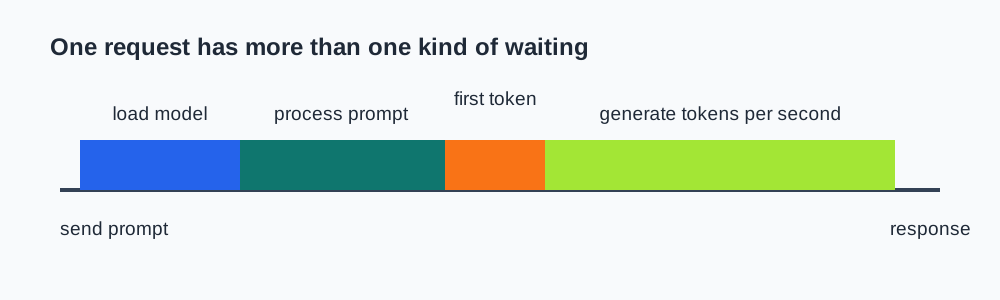
For interactive local AI work, I pay attention to four measurements:
- Load time is how long the runtime takes to load the model.
- Time to first token is how long you wait after sending a prompt before text begins to appear.
- Tokens per second is the generation rate after the first token.
- Memory use tells you whether the setup leaves enough room for your actual workflow.
For long running sessions, tokens per second are probably the most important metric, while many small tasks benefit more from low time to first token.
Use A Repeatable Prompt Set
Make sure you are always asking the same set of prompts to each model/configuration when testing. If you change the prompt, add more information to context, or impact what data is sent to the model in anyway it will skew your comparison.
Try to use a prompt that is both representative of your typical tasks and sufficiently long in both the prompt and response to accurately measure performance.
To compare performance change one parameter at a time between each run until you dial in the optimal configuration for your hardware. You can then save those settings in LM Studio.
Know When To Measure Quality
When comparing configuration options, you can safely ignore the quality of the output from the model. The goal of configuring one model is to get it to load and perform efficiently on your hardware.
Once you have multiple models configured for your hardware you can now compare the quality of the output of those models to determine which one best meets your needs. Again make sure to use prompts that are representative of your typical tasks.
I personally like to just use a model for real world work and see how it feels compared to other models. This is usually the best indicator of its practical quality.