Quantization is a confusing sounding word and a topic that overwhelms many people when they first encounter it, but it is much simpler than in sounds.
What is Quantization
As we already know a model is essentially a bunch of arrays of numbers. Those numbers are usually stored as 32 or 16 bit numbers which provides lots of precision but also takes up a significant amount of memory. These full size models are often labeled as FP32, FP16, or BF16.
Quantization is the process of reducing the number of bits used to store each number in the model's weights. You will often see quantizations referred to as Q4, IQ5, Q4_K_M, Q8, etc.
Important: The number in these labels indicates the number of bits used per weight, so higher numbers will be more precise, but also take up more memory.
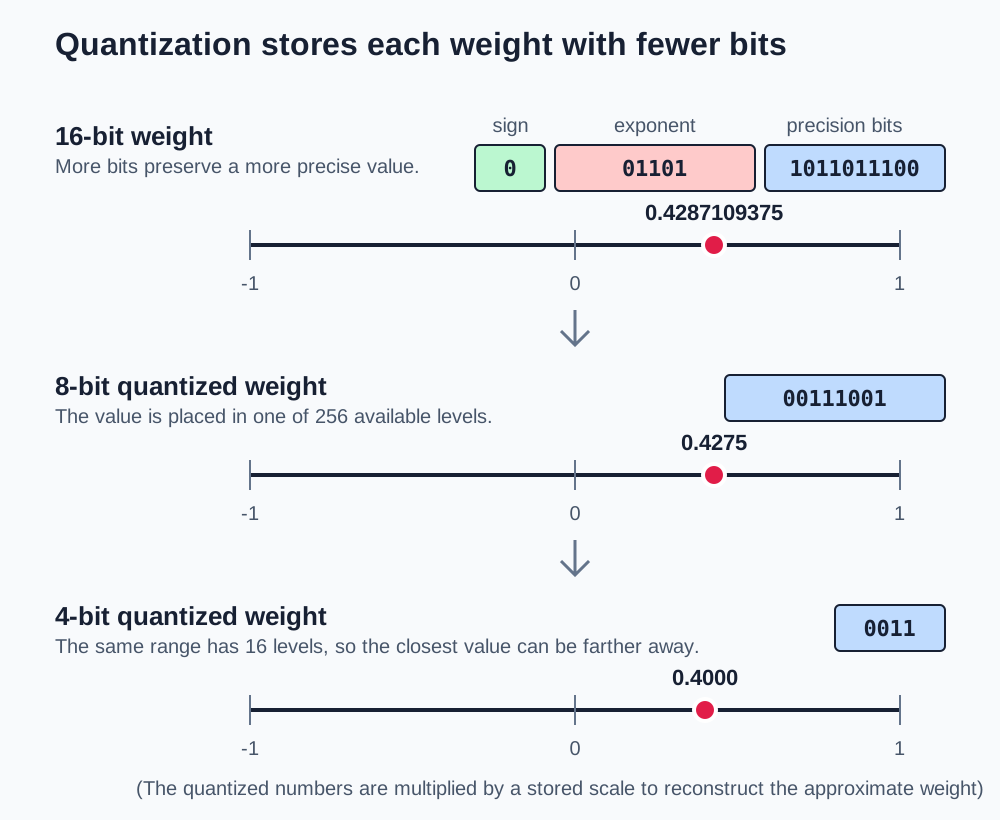
In general quantization will reduce the size of the model by the difference in the number of bits used per weight. For example, moving from 16-bit to 8-bit quantization roughly halves the memory required for the model's weights.
Reading Quantization Labels
Quantization names vary by format and publisher, but there are some common things to look out for when interpreting these labels. Let's use the label UD-Q4_K_S as an example. We can also reference the Qwen3.6-35B-A3B model to see additional quantization examples.
UD
The UD prefix stands for Unsloth Dynamic and is just telling us that this model is quantized using Unloth's Dynamic quants.
For the most part you can ignore any of these prefixes that come before the main name so we will focus on the Q4_K_S part.
Q4
The Q stands for "quantized." and the number indicates the number of bits used per weight. In our case this is a 4-bit quantization.
K
The K in the label indicates this model uses K-Quants for quantization. The idea of K-Quants is to try to quantize the model more efficiently to maintain higher quality outputs compared to standard quantization methods.
S
The S in the label indicates the size of the quantization. Models with the same quantization can have different sizes since they may leave certain high impact weights larger to preserve quality.
There shouldn't be a massive difference between the smallest and largest models at the same quantization so focus on using whichever model fits your memory and performance needs.
Other Common Quantization Labels
Here are some other common quantization labels you might encounter:
IQ3- This means the model was quantized using I-Quants. I Quants are generally best at small bit numbers (3 or less) while K-Quants excel at larger bit numbers (4+).Q8_0- Similar to I-Quants and K-Quants this also indicates a specific way the model was quantized. This version of quantization doesn't focus on any special tricks like K-Quants or I-Quants so it is best suited for larger bit numbers (8 bits).
What Quantizations Mean For You
Understanding the inner workings of the different quantizations of each model really doesn't matter too much for you. The important part is knowing how they affect memory usage and performance so you can choose the right model for your setup so here are some things to keep in mind.
- Use the largest quantization your hardware can support at reasonable speeds
- Using a smaller quantization of a larger model will often outperform a larger quantization of a smaller model
- Quantizations below 4 bit may significantly reduce model quality, so use them with caution.
- Higher quantizations (8 bit and above) are nearly identical to the original full-precision model in terms of quality.
- 4 bit quantization are often the sweet spot between memory savings and model quality.
- Try different quantizations of the same model that use different techniques or from different sources since they will often have varying performance and quality characteristics.
Quantization Does Not Solve Every Memory Problem
While quantization is incredibly effective at reducing the memory footprint of model weights, it does not reduce the memory to store the context and KV cache during text generation.
Just because you can fit a model on your hardware does not mean it is actually usable since agentic coding often requires significant context and KV cache memory. Make sure to leave plenty of headroom for these additional memory requirements.
Choosing Your First Quantization
When you are new to a model, I recommend choosing a middle quantization that fits comfortably in your VRAM or unified memory. A common starting point is a Q4 or Q5 variant.
If the model barely fits, go down one quantization level or choose a smaller model. If it runs quickly and you have a lot of unused memory, compare a higher quantization with the same prompt set. Do not assume the largest file is automatically worth the slower load time and reduced context headroom.
Demo: Find a Suitable Quantization
Now I want to show you how I would go about using all this information to find a model suitable for my hardware.
After I find a model, I want you to spend some time searching hugging face to find a quantization that works on your hardware. To limit your search you can search just for Qwen models to find a model that will work well for you. Remember you will need to find quantizations of these models since sometimes your results only show the full size models.
Loading the Model
Now let's load that model into LM Studio and try it out to see how it performs with your hardware.
You may notice that even though the model theoretically fits in your available memory, it might still run slower than expected or encounter memory issues. We will be addressing those issues in the next lesson.