The RGB model from the last lesson has a small, fixed job. It receives three numbers and returns three numbers. An LLM is the same general type of system, but it has been trained on language and has enough parameters to find patterns across an enormous amount of text.
This lets it translate, summarize, write code, answer questions, and follow instructions. It does not work by looking up a complete answer in a database. It works by predicting what token should come next.
Text Becomes Tokens
LLMs cannot directly read a JavaScript string. They need text converted into numbers first. This is where tokenization comes in.
A token is a small piece of text. It can be a word, part of a word, punctuation, or a space followed by a word. There is no one-token-per-word rule.
"I like local AI!"
["I", " like", " local", " AI", "!"]
Each token maps to a numeric representation. This is why token count matters more than character count when you work with LLMs. A short-looking prompt can use more tokens than you expect, especially when it contains code, JSON, or uncommon text.
Predicting The Next Token
At its core, an LLM repeats one job: look at the tokens it has so far and predict the next token. If the input is The capital of France is, the model might assign a high probability to Paris.
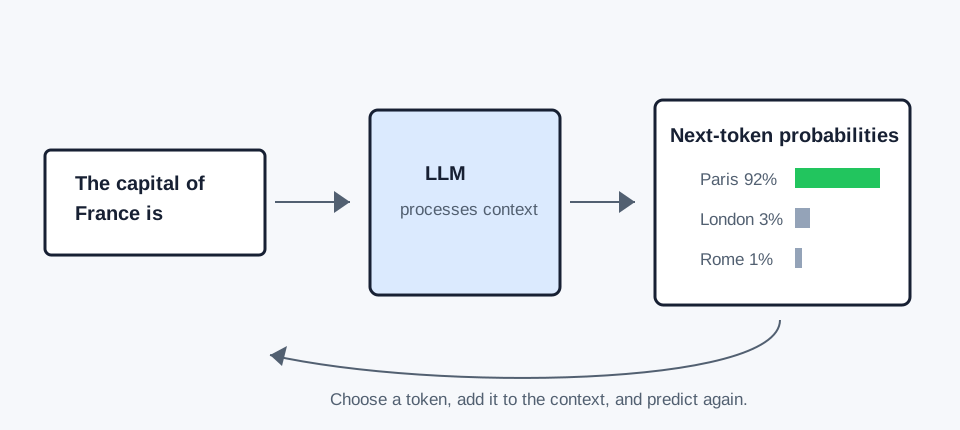
Once the model chooses Paris, that token becomes part of the input for the next prediction. It keeps repeating until it reaches a stop token, a configured output limit, or another stopping condition.
Context Is The Model's Working Memory
Every token the model can see at a given moment is its context. This includes your system prompt, your current message, earlier messages, tool results, and documents.
When you chat with an LLM, your application generally sends the conversation history again with each request. The model does not remember your previous message because you talked to it before. It sees that earlier message because it is included in the current context.
const messages = [
{ role: "system", content: "You are a concise assistant." },
{ role: "user", content: "My favorite color is green." },
{ role: "user", content: "What is my favorite color?" },
]
The only thing you need to be aware of is that context has a limit. A model with an 8,000 token context window has to fit the prompt, conversation history, and generated answer within that shared budget. Once the context fills up, an application must remove, summarize, or retrieve only the most relevant older information.
Why The Same Prompt Can Produce Different Results
The model produces a probability for every possible next token. We need a rule for choosing one. This is where generation settings come in.
For code, JSON, and other precise output, lower variation is usually easier to work with. For brainstorming or creative writing, a little more variation can be useful. There is no magic set of values. The best settings depend on the job you are asking the model to do.
Example
We will be using the prompt Write a haiku about trees to test what happens when we change each of these parameters.
temperature
Controls how strongly the model prefers high-probability tokens. A value of 0 makes the model deterministic since it always chooses the highest-probability token, while higher values increase randomness and give the model more variation and creativity in its responses.
top-p
Limits which tokens a model can select from as the next answer by considering their cumulative probability and only including the top tokens whose combined probability reaches the specified threshold.
For example, a top-p of 0.9 means the model will only consider the smallest set of tokens whose combined probability is at least 90%.
top-k
Limits selection to a specific number of the most likely tokens. For example, a top-k of 5 means the model will only consider the 5 tokens with the highest probabilities when generating the next token.
seed
Sets the seed for random choices, allowing you to reproduce them when the rest of the setup stays the same.
min-p
Sets the minimum allowed probability for the next token selection. For example, a min-p of 0.1 ensures that the model will never select a token with a probability lower than 0.1.