Our basic ABAC system works, but many real world applications need more sophisticated features. Let's add field-level permissions, environment-based rules, and automatic database filtering.
New Requirements
In many applications certain users are restricted on which fields they can read or modify. This is something that is impossible to do in RBAC, but ABAC makes these policies straightforward to express using field-level permissions.
1. Field-Level Read Permissions
Different roles should see different fields on documents:
| Field | Admin | Editor | Author | Viewer |
|---|---|---|---|---|
title |
✅ | ✅ | ✅ | ✅ |
content |
✅ | ✅ | ✅ | ✅ |
status |
✅ | ✅ | ✅ | ✅ |
isLocked |
✅ | ✅ | ✅ | ✅ |
creatorId |
✅ | ✅ | ✅ | ✅ |
lastEditedById |
✅ | ✅ | ✅ | ✅ |
createdAt |
✅ | ✅ | ✅ | ❌ |
updatedAt |
✅ | ✅ | ✅ | ❌ |
2. Field-Level Write Permissions
When creating or editing documents, only certain fields should be writable:
| Field | Admin | Editor | Author |
|---|---|---|---|
title |
✅ | ✅ | ✅ |
content |
✅ | ✅ | ✅ |
status |
✅ | ✅ | ❌ |
isLocked |
✅ | ❌ | ❌ |
Authors can write content but can't change document status or lock documents.
3. Environment-Based Rules
Since this company values work-life balance, editors and authors are not allowed to make changes on weekends which is an example of an environment-based rule that uses attributes from neither the user nor the resource.
4. Automatic Database Filtering
To make our authorization system more DRY and cleaner, we can automatically filter database queries based on the user's permissions. This ensures that users only see the documents/projects they are allowed to access without having to duplicate permissions in queries and our policy engine.
1. Implementing Environment Based Rules
Adding environment-based rules is straightforward. We can just check the current day in our permission builder and use that to filter which permissions we allow:
const builder = new PermissionBuilder()
const dayOfWeek = new Date().getDay()
const isWeekend = dayOfWeek === 0 || dayOfWeek === 6
builder.allow("document", "read")
// Only allow updates on weekdays
if (!isWeekend) {
builder.allow("document", "update", { isLocked: false })
}
Let's implement this rule now.
2. Implementing Field-Level Permissions
Field level permissions are much more complicated to implement. This is mostly because consuming field level permissions requires lots of code. Implementing field level checks in our policy engine is actually pretty easy.
Extending the Permission API
We need to enhance our can() function to support field checks:
// Check if user can read a specific field
permissions.can("document", "read", document, "isLocked")
// Check if user can update a specific field
permissions.can("document", "update", document, "status")
Enhanced Policy Definitions
The allow function needs to accept an optional fields array as a fourth parameter:
function addEditorPermissions(
builder: PermissionBuilder,
user: Pick<User, "department">,
) {
builder.allow("document", "read") // All fields by default
builder.allow(
"document",
"update",
{ isLocked: false },
["content", "title", "status"], // Restricted to these fields
)
}
Implementing the Permission Builder Updates
We only need to change three things in our existing builder:
- Add support for field-level permissions in the
allow()method. - Update the
can()method to check field-level permissions. - Add a way to filter permitted fields
Let's do that now.
Using Field Permissions
Adding support for field permissions takes a little bit of TypeScript wizardry and extra work, but for the most part isn't too bad. Where field permissions become difficult to work with is when consuming which fields a user has access to and ensuring the UI works for all possible permutations.
We need to update all the following locations:
- Forms
- Schemas
- Display pages
Let's do that now.
3. Implementing Automatic Database Filtering
Since our ABAC conditions are just JavaScript objects of simple conditional checks, we can easily convert them into SQL WHERE clauses:
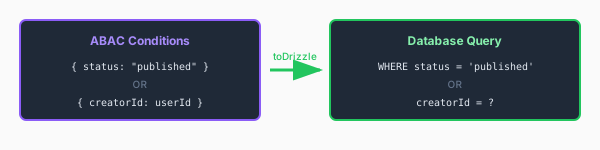
This can get complicated when dealing with multiple conditions and various combinations of permissions, but once you get the base layer down adding new conditions is pretty simple.
This is powerful because:
- We only fetch data the user can see
- The database does the filtering (efficient!)
- No chance of data leaks from forgetting a filter
Let's implement this now.
Branch Checkpoint
After completing this lesson, your code should match:
Branch: 7-advanced-abac
Run the following to sync up:
git checkout 7-advanced-abac