Project Overview
Before we start building permission systems, let's understand the application we're working with. It's a simple document management system with users, projects, and documents.
Code Walkthrough
Let's take a minute to look through all the code and the actual application to see how everything fits together.
This project is a Next.js and TypeScript project, but you don't need to know any React or Next.js to follow along with this project. 95% of the code we write will be pure TypeScript and we will only touch React a few times for UI specific permissions.
The Data Model
Our application has three main entities with clear relationships:
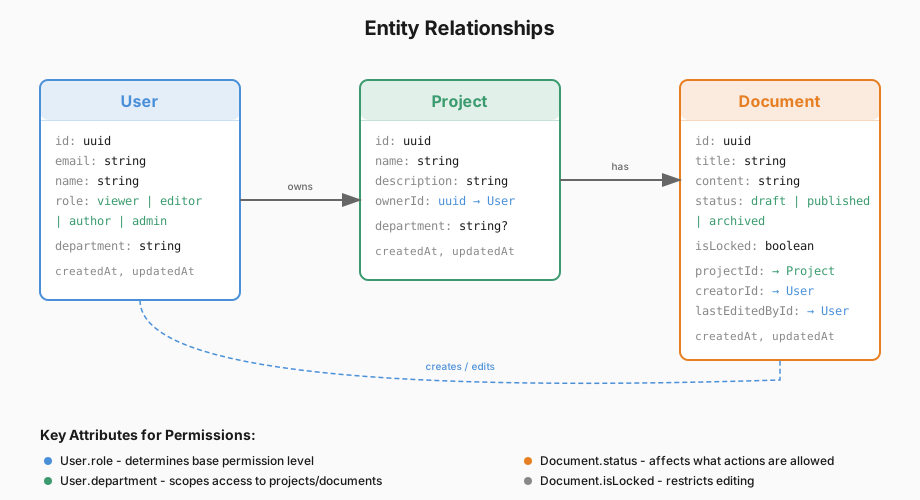
Users
Users are the people who interact with the application. Each user has:
| Field | Description |
|---|---|
id |
Unique identifier |
email |
Login credential |
name |
Display name |
role |
One of: viewer, editor, author, admin |
department |
The department they belong to (e.g., "Engineering", "Marketing") |
Projects
Projects are containers for documents. They're scoped to departments:
| Field | Description |
|---|---|
id |
Unique identifier |
name |
Project name |
description |
What the project is about |
ownerId |
The user who created the project |
department |
The department this project belongs to (can be null for cross-department projects) |
Documents
Documents are the core content of the application:
| Field | Description |
|---|---|
id |
Unique identifier |
title |
Document title |
content |
The actual document content |
status |
One of: draft, published, archived |
isLocked |
Whether the document is locked from editing |
projectId |
The project this document belongs to |
creatorId |
The user who created the document |
lastEditedById |
The user who last modified the document |
Desired Permissions
Right now, the application tries to follow the below set of permissions:
Projects:
| Role | View | Create | Edit | Delete |
|---|---|---|---|---|
| Viewer | ✅ | ❌ | ❌ | ❌ |
| Editor | ✅ | ❌ | ❌ | ❌ |
| Author | ✅ | ❌ | ❌ | ❌ |
| Admin | ✅ | ✅ | ✅ | ✅ |
- All roles other than
admincan only view projects with adepartmentthat matches their own department or withdepartment: null(cross-department projects)
Documents:
| Role | View | Create | Edit | Delete |
|---|---|---|---|---|
| Viewer | ✅ | ❌ | ❌ | ❌ |
| Editor | ✅ | ❌ | ✅ | ❌ |
| Author | ✅ | ✅ | ✅ | ❌ |
| Admin | ✅ | ✅ | ✅ | ✅ |
Next Steps
The next thing we need to work on is fixing the bugs in our permission system and making it more organized to prevent future bugs and make extensions easier in the future.
All current bugs are marked with a FIX: comment and all permissions checks have a PERMISSION: comment above them.