Role-Based Access Control (RBAC) is the most common permission system you'll encounter. If you've ever assigned a user to an "admin" or "editor" role, you've used a version of RBAC.
The Core Concept
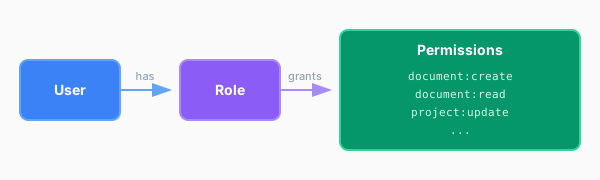
RBAC is built on a simple idea: permissions are assigned to roles, and roles are assigned to users.
User → Role → Permissions
This differs from our current implementation since we are defining specific permissions that each role has instead of adhoc if checks spread throughout our codebase.
The RBAC Model
A typical RBAC implementation has three components:
| Component | Description | Example |
|---|---|---|
| Users | The people using your system | Alice, Bob |
| Roles | Named groups of permissions | admin, editor, viewer |
| Permissions | Specific actions that can be performed | document:create, document:delete |
Why RBAC Works
As a developer, RBAC offers significant advantages over scattering ad-hoc permission checks throughout your codebase:
1. Centralized Permission Logic
Instead of hunting through dozens of files to find every if (user.role === "admin") check, all your permission logic lives in one place.
2. Single Point of Change
When business requirements change (and they will), you update the role definition once. Compare this to finding and updating every if (user.role === "editor" || user.role === "admin") scattered across your codebase.
3. Cleaner, More Readable Code
Your application code becomes about what you're checking, not how:
// Ad-hoc: What does this even mean?
if (user.role === "admin" || user.role === "editor")
// RBAC: Clear intent
if (can(user, "document:update"))
4. Reduced Bugs
Ad-hoc checks are error-prone. Forget one check? Security hole. Copy-paste the wrong condition? Security hole. With RBAC, the logic is defined once and reused everywhere.
RBAC in Code
A basic RBAC implementation looks something like this:
// Define your permissions
type Permission =
| "document:create"
| "document:read"
| "document:update"
| "document:delete"
| "project:create"
| "project:read"
| "project:update"
| "project:delete"
// Map roles to permissions
const permissionsByRole: Record<UserRole, Permission[]> = {
admin: [
"document:create",
"document:read",
"document:update",
"document:delete",
"project:create",
"project:read",
"project:update",
"project:delete",
],
editor: ["document:read", "document:update"],
viewer: ["document:read"],
}
// Check if a user can perform an action
function can(user: { role: UserRole }, permission: Permission) {
return permissionsByRole[user.role].includes(permission)
}
Usage is clean and readable:
if (can(user, "document:create")) {
// Show create button
}
if (!can(user, "project:delete")) {
throw new AuthorizationError()
}
Implementation
Let's implement a simple RBAC system into our project.
Checkpoint
We just finished implementing the RBAC permissions file, so now it is your turn to use these permissions in our application.
You can checkout this branch to follow along from where we are:
git checkout 3.5-basic-rbac-checkpoint
What We Gain
After this refactor:
| Benefit | Description |
|---|---|
| Single source of truth | All permissions defined in one place |
| Readable code | can(user, "document:create") is self-documenting |
| Type safety | TypeScript ensures we only use valid permission names |
| Easy updates | Change a role's permissions in one file |
Branch Checkpoint
After completing this conversion, your code should match:
Branch: 4-basic-rbac
Run the following to sync up:
git checkout 4-basic-rbac
What's Next
Our RBAC system works great for the current permissions. But what happens when we need to add more complex rules?