To get started I will show you how to use LM Link to do remote model access between two LM Studio installations since this is the easiest to setup
Enable LM Link On Both Devices
In order to use LM Link you just need to click on the LM Link button in the bottom left of the sidebar and then click "Enable LM Link". You will need to create an account and sign in first if you don't have an account. After a few seconds you should be shown a screen with an "Add Device" button to link your devices together.
Now all you need to do is click this button and choose the device type you want to add. Currently LM Studio only supports iPhone, iPad, desktop, and CLI devices.
To setup another desktop machine it is as simple as:
- Install LM Studio on the new device
- Log into the same account
- Click on the LM Link button and enable LM Link
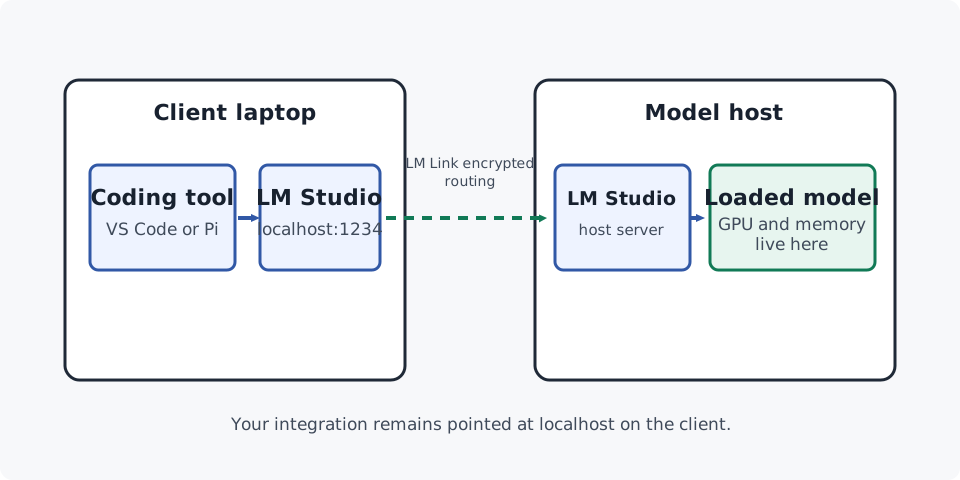
Once that is done you now have access to your remote models from the client device.
Test the Connection
On your model host, load the model you want to use. On the client machine you should now see that model in your list of models that you have access to and you can directly chat with it inside LM Studio
Using Your Remote Models In Dev Tools
The really nice thing about LM Studio is that you don't need to change anything to use models from a remote machine since they all route through localhost. LM Link handles all the routing between machines behind the scenes. This means we can continue using our existing local development setup on any client machine without any modifications.
When LM Link Isn't Enough
LM Link is ideal for a personal collection of LM Studio devices. It has a small setup surface and keeps your integrations local to the client computer. When you try to scale up to working with multiple developers or need to support devices that don't work with LM Link then it is time to upgrade to a custom setup.
LM Link also has usage limits and I would not be surprised if it becomes a paid feature eventually. For all these reasons I prefer to use a custom Tailscale setup instead.
Try It Yourself
If you haven't already, try setting up LM Link between your phone/other device and your main machine.
- Enable LM Link on a client and model host.
- Load a model on the host and select it from the client LM Studio installation.
- On the client, start the LM Studio server.
- Connect to a remote model and send it a short prompt from the client.